AutomationsCore platform

Recurring tasks run themselves.

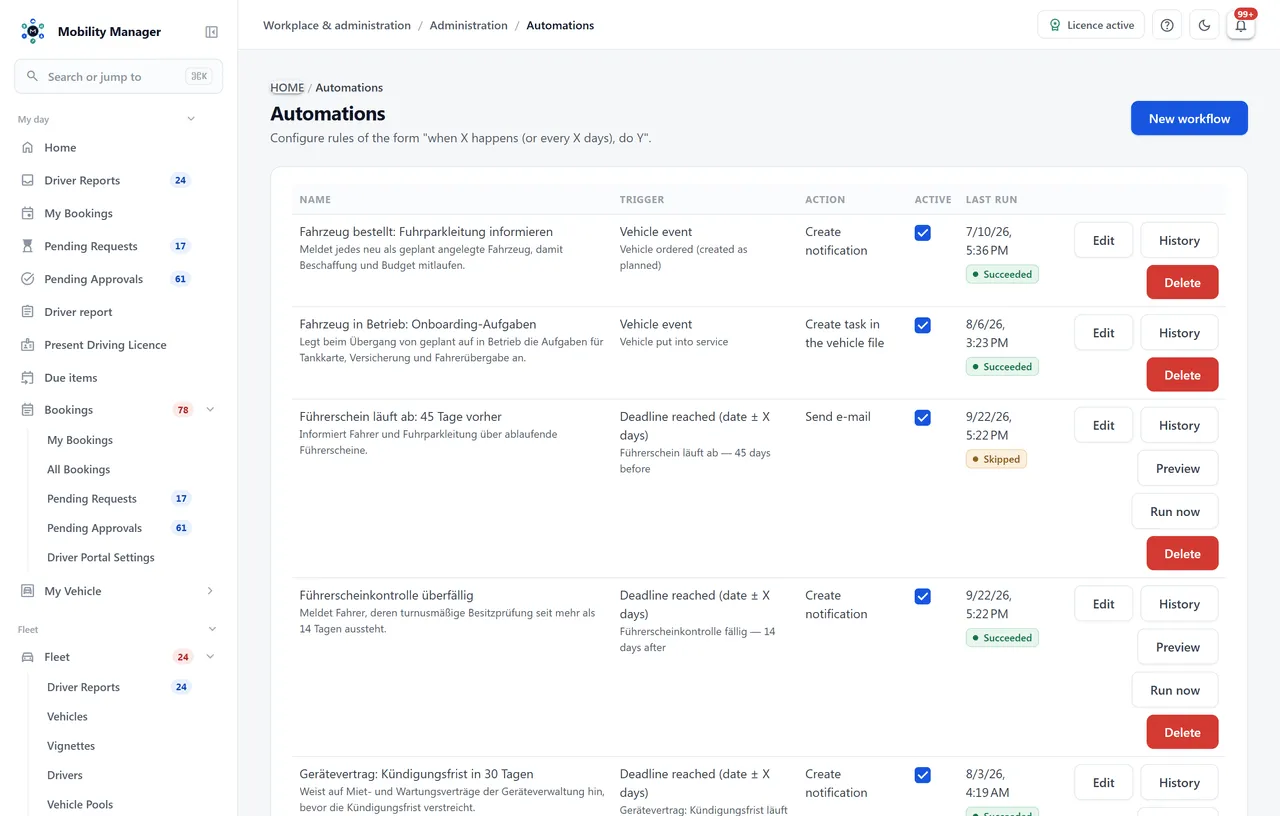
Define a trigger, action and recipients, then see what the rule actually did.

Request a demo

30 minutes, the real product, your workflow at the centre — free and non-binding.

Package: Both packages

How you use it

This is what it looks like day to day — in three steps.

  1. Choose the trigger

    Select a deadline, supported vehicle event or schedule. Define which records the rule applies to.

  2. Check the action and recipients

    Configure the action and appropriate recipients. Review the preview before the first run.

  3. Review execution history

    Activate the rule and check its history. Follow up on successful, skipped and failed runs.

Automation overview · Real product view with demo data

Automation overview · Real product view with demo data

In detail

Everything this module takes off your plate.

Deadlines from fifteen sources

Roadworthiness test, UVV inspection, safety inspection, tachograph, fire extinguisher, maintenance due date, seasonal tyre change, lease end, notice period on vehicle and device contracts, vehicle tax, insurance policy end, licence expiry, due licence check and due driver instruction. The rule fires a chosen number of days before or after.

Vehicle events

When a vehicle is created as planned, put into service or retired, an action can hang off that — the procurement note, the handover checklist, the de-registration.

Schedules without a deadline

Some things have no due date, only a rhythm: 'ask for odometer readings every 30 days'. Intervals from one to 365 days are free to choose.

Five actions

Send an email, send drivers an odometer reminder, raise an in-app notification, create a task in the vehicle file, or call a webhook. Only actions compatible with the chosen trigger are offered.

Recipients from the system, not from a list

Free addresses, the contacts of a CRM partner, or all fleet managers at once — plus an optional CC recipient on the same message rather than a second send.

Preview before the first run

Deadline rules answer, on demand, who they would write to today — with a count and samples. Only then do you arm them.

History per rule

Every run is recorded with its time and outcome: succeeded, failed, or skipped because there was nothing to do.

A skip log

The more important question is who an automatic message did not reach. A dedicated report names the case and the reason for the last 30 days — a driver without an email address, for instance.
Run outcome

  1. Succeeded
  2. Skipped
  3. Failed
Licensing and rollout

Pay only for what you need. Run it where you want.

View pricing and packages
Module scope
You unlock what your team needs — package and selected modules define the scope, yet you still install a single application. We confirm which capabilities are included before you start, so your quote fits exactly.
Buy or hire-purchase
Buy once per vehicle and use it for good — or finance the purchase through hire-purchase. Unlimited users and drivers are always included; maintenance with updates and support is shown transparently per vehicle and year.
Operations and rollout
On your servers, in your private cloud or as a container — your data stays with you. We plan data migration, setup and training together with your IT team; managed operations are available on request.Self-hosted fleet management software: deployment and cost
FAQ

Common questions.

Personal demo

See Automations live — on your own workflow.

Tell us how you work today. We show you the relevant features in the real product, answer your questions about rollout, operations and licensing — and get back to you personally by email after your request to find a time that suits you.

Cloudkasten GmbH

Developed and supported in Erftstadt near Cologne, Germany. You talk directly to the team behind the software.
info@cloudkasten.net
+49 2235 978 979 0

About the company (German)

Automation overview

Product screenshot with demo data. Scroll sideways to inspect the enlarged view.

Automation overview · Real product view with demo data