Templates instead of per-vehicle work
A maintenance type is defined once — with interval, category and scope — and then applied to vehicles.
Organise recurring work by time, mileage or meter readings and keep completion with the vehicle.
30 minutes, the real product, your workflow at the centre — free and non-binding.
Package: Both packages
How you use itSpecify the recurring work and what determines its due date: time, mileage or a supported meter reading.
Connect the vehicle to its maintenance template — one by one, or through a maintenance profile that equips new vehicles at commissioning. Follow upcoming or overdue work in the dashboard.
Complete the service with the required details. Check the history and next due date on the vehicle.
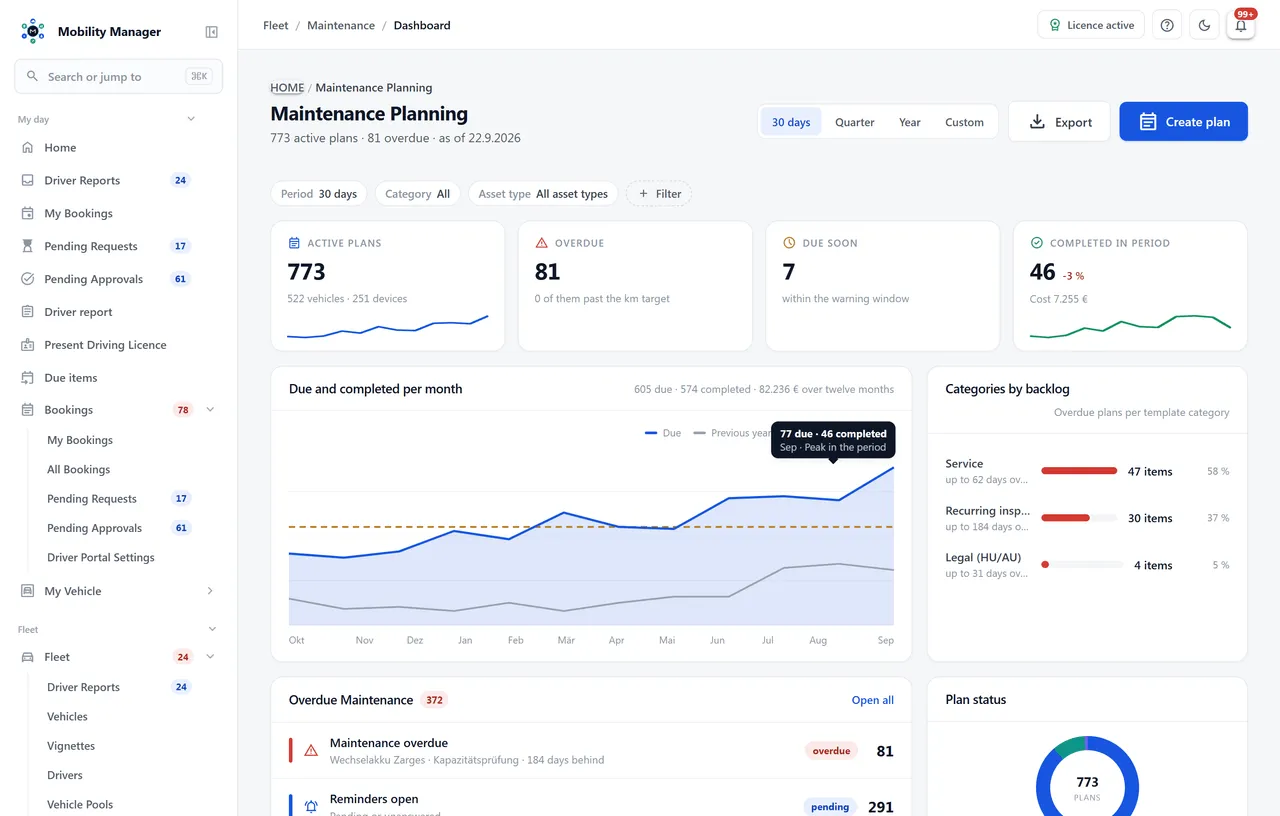
Maintenance dashboard · Real product view with demo data
A maintenance type is defined once — with interval, category and scope — and then applied to vehicles.
A maintenance profile bundles templates for a group of vehicles — say "electric vans" by vehicle type and drive — and may override their intervals. When a vehicle goes into service, the system proposes the matching plans preselected or creates them automatically, depending on the setting. First due date, mileage target and recorded inspection dates are carried over.
Due dates derive from date, mileage, operating hours, starts — or whichever comes first. An hours or starts due date only appears when that counter is activated on the vehicle.
When a vehicle is due for its statutory inspection follows from vehicle type, first registration and the previous inspection — not from a hand-maintained date. The rule set is configurable per tenant and computes the next date itself.
Refrigerated vehicles carry the three ATP inspections (cooling performance, leak test, body pressure), gas-powered vehicles the gas system inspection — each with last and next date, interval and a required-inspection flag. They are unlocked by the refrigerated marker on the vehicle type and by the drive type, not by a hard-coded list of vehicle classes.
The dashboard separates overdue services from the next 30 days — including counters for management.
Completed services with date, odometer, cost and workshop stay permanently on the vehicle.
Reminders are records: they are acknowledged or dismissed with a reason instead of simply disappearing.
Export maintenance history and plans — for auditors, workshops or proof obligations.
This page describes the module in detail. How maintenance profiles equip new vehicles with their maintenance plans at commissioning — and bring the existing fleet up to date in one step — is on the overview page
Fleet maintenance planningYes. Statutory inspections are maintenance templates like any other recurring check — with their own interval, category and history. Inspection dates additionally appear in the due-dates tab of the vehicle file.
From the vehicle's odometer readings — captured manually, in bulk, via driver submissions, from refuellings and services, or from the fuel card import. Operating hours and starts come from manual entry and from completing a service.
Yes, through maintenance profiles. A profile states which vehicle types and drives it applies to and which templates with which intervals belong to it. When a vehicle is created as in service, or a planned vehicle is commissioned, the matching plans appear preselected in the dialog; in "Automatic" mode they are created without asking. Existing plans are never duplicated, and "Apply to fleet" with a preview covers the vehicles you already run.
Yes. Templates are freely definable, so operation-specific checks — for example on superstructures or special equipment — can run with their own interval.
Yes, as inspection certificates on the vehicle: the three ATP inspections and the gas system inspection with last date, interval and a derived next date. They appear in the vehicle's due-dates list and in the fleet-wide appointment report including its exports. The reminder e-mail currently covers statutory and safety inspections plus maintenance plans — the special inspections are not yet a source for it.
Tell us how you work today. We show you the relevant features in the real product, answer your questions about rollout, operations and licensing — and get back to you personally by email after your request to find a time that suits you.
Developed and supported in Erftstadt near Cologne, Germany. You talk directly to the team behind the software.
info@cloudkasten.net
+49 2235 978 979 0