Booking wizard for drivers
Pick period, purpose and vehicle or pool — with live availability and odometer capture at handover and return.
Drivers request, dispatchers plan — on the same board. Everyone sees which vehicle is needed when, and where there is still room.
30 minutes, the real product, your workflow at the centre — free and non-binding.
Package: Both packages
How you use itChoose the start, end and suitable vehicle pool. Create a booking or vehicle request with the details your team needs.
Review the request where approval is required. Assign a vehicle manually or through the configured assignment rule.
Review occupancy on the dispatch board. Record the start and return, then complete the booking.
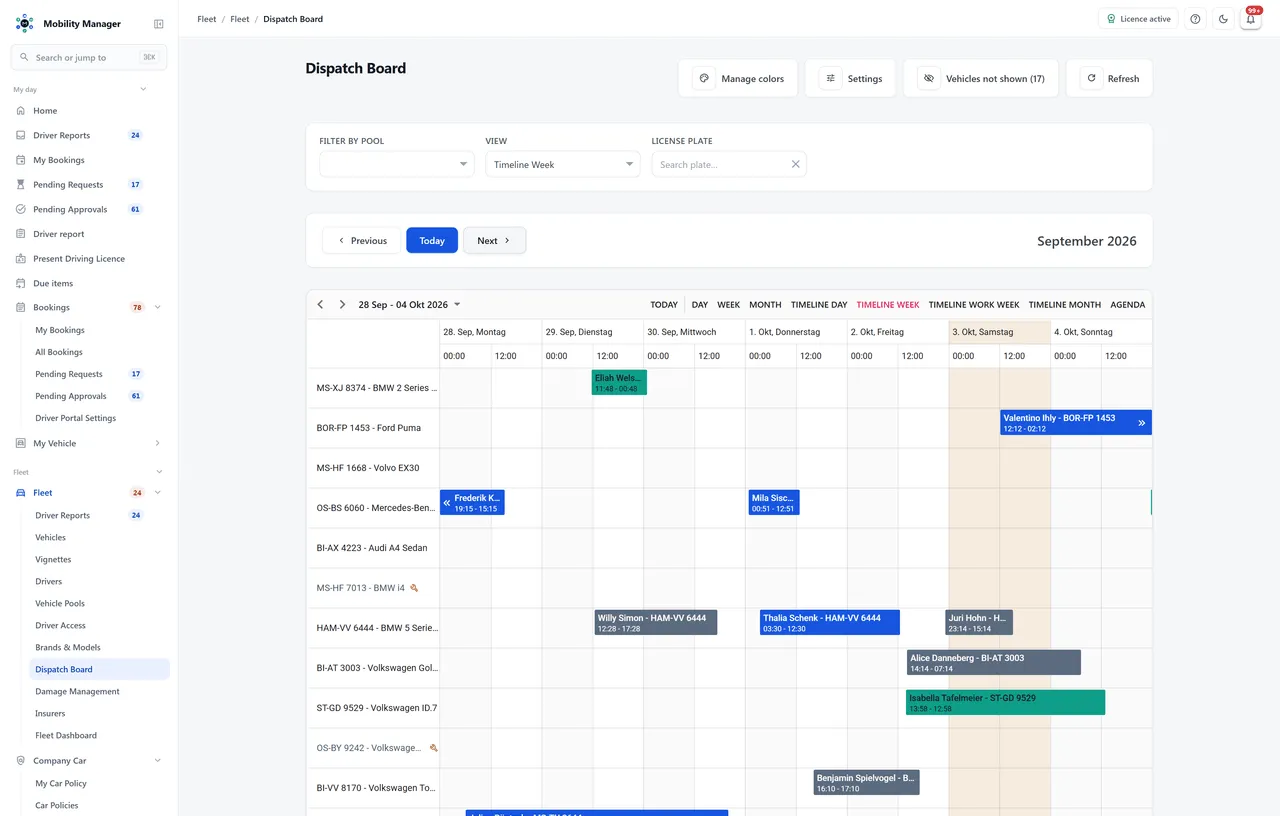
Dispatch board with vehicles and booking periods · Real product view with demo data
Pick period, purpose and vehicle or pool — with live availability and odometer capture at handover and return.
Switchable per tenant. Approvers get their own queue with a counter in the navigation; approving your own booking is blocked by the system.
'LeastUtilized' spreads wear evenly, 'LowestCost' minimizes cost per kilometre. Simultaneous requests are resolved conflict-free with retry logic.
Group vehicles by department, location or type. Drivers only see and book pools they are explicitly assigned to.
One row per vehicle, one bar per appointment: gaps, overlaps and idle vehicles at a glance. Time raster, sub-divisions and a working-hours-only view are each dispatcher's own setting.
Drag a booking onto another vehicle or another slot. The board can ask before every move, and conflicts with the driver, the vehicle or a trailer are named rather than silently created.
Group the board by pool, brand, model or body type. Hide what is not relevant today — a dedicated list always says which vehicles are missing and why: no pool, still planned, retired, in the workshop.
Your own colour categories per tenant, plus a free colour per appointment. A category still in use is retired rather than deleted — existing bookings keep their colour.
Recurring trips are created as a series — up to 43 occurrences, and only if every single one is free. Editing and cancelling ask whether you mean this occurrence or the whole series.
A trailer gets its own appointment on its own row but stays attached to the main one: move the tour and the trailer moves with it.
Subject, destination, order number, cost centre, project and start/end odometer are all in the booking dialog. If a driver is missing, a short driver file is created straight from it.
For every vehicle the board shows the next roadworthiness test, the odometer, lease utilization and this month's dispatch utilization — without opening the vehicle file.
Appointments without a reservation — workshop, inspection, blocked periods — appear on the same board but stay read-only there: they are edited in the vehicle file, where they originate.
Staff can register a need without knowing a particular vehicle; dispatch assigns and confirms.
Visible and mandatory fields, lead and cancellation times, the booking horizon, a charging buffer after every EV booking, ride sharing and hiding lease vehicles that are already over their mileage — all configured per tenant, no code change involved.
Yes. The approval step is configured per tenant. Without it a booking is confirmed immediately; with it the booking lands in the queue of the authorized role.
With the driving licence control module, yes. Vehicles and models carry a licence requirement; at booking time the system checks the driver's recorded licence classes and verification status.
Unlimited. MobilityManager is licensed per vehicle, not per user — drivers, approvers and administrators cost no extra fees.
No. The board and the booking wizard are the same module on the same data — two surfaces for two roles. A dispatcher needs the right to see and manage all bookings; a driver still only sees their own.
There is a dedicated list for exactly that. It names the reason per vehicle: not assigned to a pool, still planned, retired, in the workshop, stolen, being sold — or simply hidden by your own board settings. Vehicles outside your site-based data scope are only counted, never named.
Tell us how you work today. We show you the relevant features in the real product, answer your questions about rollout, operations and licensing — and get back to you personally by email after your request to find a time that suits you.
Developed and supported in Erftstadt near Cologne, Germany. You talk directly to the team behind the software.
info@cloudkasten.net
+49 2235 978 979 0