Safety Instruction Management Software:
Document Training Digitally
The annual driver safety instruction as e-learning, the forklift instruction with its credential, the dangerous goods course at the provider with a session — in one register instead of three lists. Whoever completes an instruction updates their credential on the driver file, and the reminder knows the next date before anyone asks.
1 register
Internal e-learning and external courses
5 target groups
All · department · location · cost centre · credential
2 types of proof
Digitally acknowledged or signed
The situation
Three lists for one duty — and none of them knows about the others
The annual safety instruction lives in a spreadsheet, the forklift licence in a folder, the dangerous goods course in Outlook. Each list is maintained on its own. Together they never agree.
The forklift licence knows nothing about the instruction
The annual forklift instruction is done — but nobody updated the date on the forklift licence in the personnel file. Six months later one list says 'due', the other says 'current', and both are right.
The course lives in Outlook
Fifteen invitations by hand, an attendance sheet on paper, and weeks later fifteen entries typed in one at a time — if someone remembers. The ADR certificate that expires after five years does not remind anyone by itself.
The day after the accident
The accident insurer asks for date, content, participant and instructor — and for which revision of the content was taught at the time. A list of ticks answers the first question. Not the second.
How it works
Document an instruction in three steps
A topic is created once. From then on the target group decides who gets it, and completion produces the next due date by itself.
Create the topic
Legal basis, repeat interval, target group, accepted type of proof. Internal with learning sections and a question pool — or external with the training provider from the CRM. Optionally linked to a credential such as the forklift licence.
Assign — or let it assign
The people picker shows only who belongs to the target group: department, location, cost centre or every holder of a credential. If you want, the nightly run assigns the topic to every credential holder who does not owe it yet.
Acknowledge, record or complete the session
The employee works through the sections, passes the comprehension check and acknowledges digitally. Or the signed attendance sheet is uploaded. Or the training session is completed for all participants in one step.
The actual lever
Instruction → forklift licence → next date. A chain, not a retype.
A forklift licence, a crane licence, an ADR certificate carry a "next instruction" date on the driver file. That date is exactly what drifts apart in separate lists — because somebody would have to retype it after every instruction.
So a topic names the credential it keeps alive. Whoever completes the annual forklift instruction has their forklift licence moved forward by the interval in the same save. And whoever holds the credential can be assigned the topic automatically — due on the date the credential says.
For externally issued certificates the same logic runs the other way: the validity in months the provider dictates produces the follow-up from the attendance.
What the system does about it
- Completion updates 'next instruction' on the linked credential — in the same transaction, not in a later run.
- The nightly run only fills the gap 'holds the credential, does not owe the topic' — it never creates a second open instruction.
- A training type with a validity in months opens the follow-up from the record itself; without a validity it stays a one-off entry.
- Reminders run before the due date per instruction, not per person — anyone owing two topics is reminded for both. Overdue items escalate to fleet management.
One register
Taught internally or attended externally — same register, same export
A topic is either internal — with its own learning content — or external, taught by a training provider. Both kinds carry a legal basis, an interval and a type of proof.
Annual driver safety instruction
Internal, as e-learning: learning sections, comprehension check, digital acknowledgement. Legal basis and annual interval sit on the topic; completion creates the follow-up assignment.
Forklift instruction
Internal or external — either way linked to the 'forklift licence' credential, whose next instruction date moves forward on completion.
Dangerous goods training
External, at the provider, as a training session with participant list and calendar invitation. The certificate's validity produces the follow-up.
First-aider refresher
External, with its own interval. The same session mechanism, the same register — without anyone maintaining Outlook and a spreadsheet side by side.
Topic built from blocks
'Load securing' is written once and composed into every instruction that needs it. Revisions carry into future instructions; instructions already given stay untouched.
Training record
No learning content, no recurrence of its own: date, trainer, certificate in one step. With a validity in months it still produces a follow-up.
External courses
Dangerous goods, forklift, first aid: the session at the provider — without Outlook on the side
An instruction is one person's obligation. A training session is one event with fifteen people in the room. The module knows both — and writes the first from the second.
Provider, venue, capacity, cost
The training provider comes from the CRM or is free text on the session; the venue from the site catalogue or as 'DEKRA academy, room 2'. Capacity is a warning to the planner, not a refusal. The course fee sits on the session with its currency.
Participant list with calendar invitation
Seat the participants, download the calendar file or send invitations by e-mail. To Outlook, a session is the same thing as a vehicle booking: one event with a stable identifier that a later cancellation withdraws — for a single removed participant too.
One step to complete
After the course: 'Held'. Every attendance is booked as an instruction, with the session date and the provider as instructor of record, and the certificate is attached. What follows — recurrence, credential, reminder — runs through the same rules as any other instruction.
For administration
The list you hand an auditor
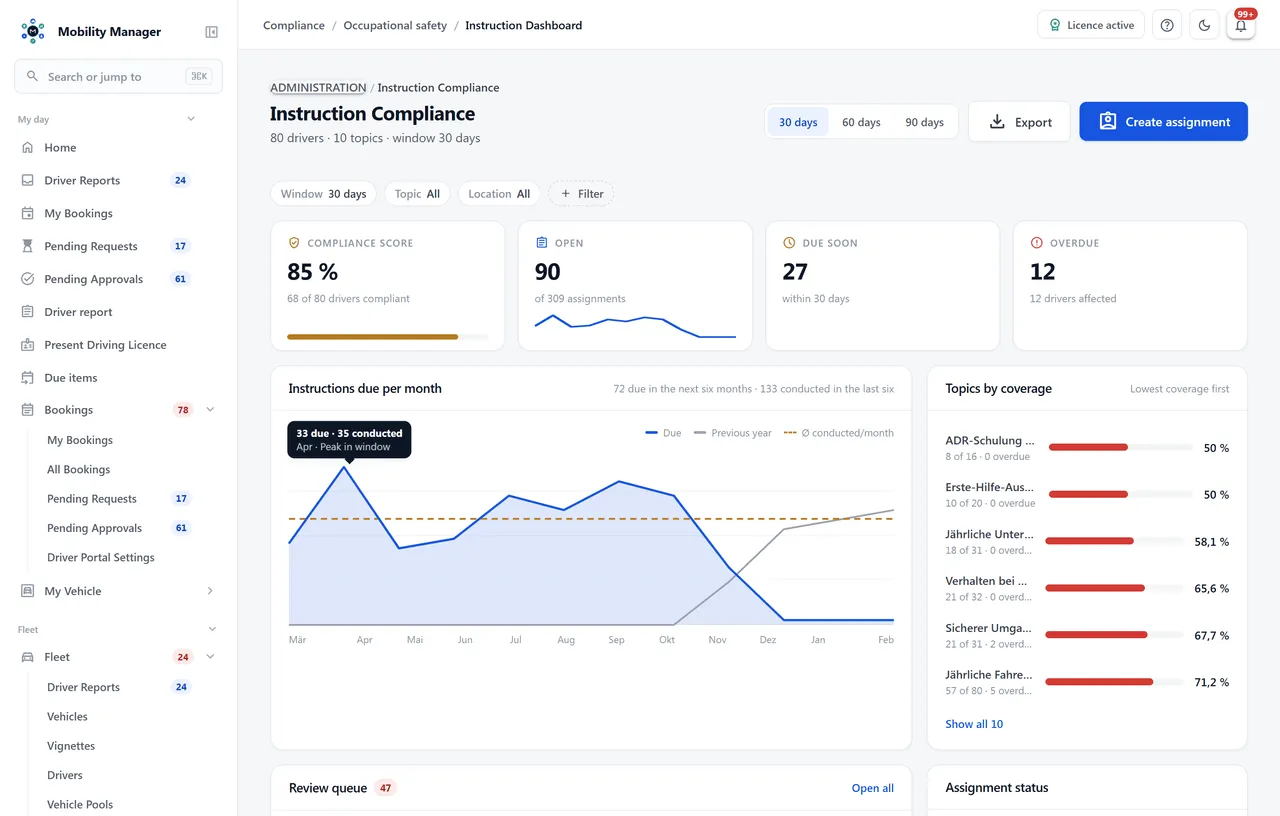
The dashboard shows what is overdue, what falls due in the coming days and which topics do not yet cover their target group completely. Underneath sits the compliance export with everything DGUV regulation 1 asks for.
And the content itself stays provable: every instruction is pinned to the revision in force when it was assigned. An auditor sees not today's text, but the one that was actually taught.
Overdue and due soon
Two lists with person, topic, due date and a jump into the driver file — overdue items on top, whatever period is selected.
Coverage per topic
How many people in the target group have the topic current, how many owe it? The figure that tells you whether the department is actually instructed.
Compliance export
Every instruction with date, content, revision, participant, instructor and type of proof — for the accident insurer, internal audit and the day after an accident.
Question pool, not questionnaire
Each attempt draws a selection from the pool, 10 out of 20 for example. Which questions someone got is recorded on the attempt. No fixed questionnaire circulates through the department.
What it is not
Not a learning management system. The instruction register of a fleet and facility system.
Anyone looking for a platform for all corporate training — course catalogue, learning paths, certificate marketplace, authoring tool — is looking for an LMS. This module answers a narrower question: is every person who drives a vehicle, operates a forklift or handles hazardous substances currently instructed, and where is the proof?
- No SCORM import and no course catalogue. Learning content comes from a block library inside the system — versioned because the proof needs the revision, not as an authoring tool.
- No learning portal for external people. External drivers are excluded because their occupational safety sits with their own employer.
- No certificate trading. A provider's certificate is attached and expires with its validity — a register does not need to know more about it.
- Instead, a module on the same driver file as licence control, credentials and devices — with the same people, sites and roles.
Anyone who needs both runs both: the LMS for training, this register for the duty to prove instruction on the vehicle, the device and the installation.
Not a point solution
Instructions, credentials and obligations in the same installation
The module runs on its own — but it shares the driver file with the other modules. Anyone running several maintains every person and every site once.
FAQ
Everything you need to know about safety instruction management
What is safety instruction management software?
It keeps track of who has to be instructed in what and when, reminds before the due date, and preserves the proof in the form an accident insurer expects: date, content, participant, instructor. MobilityManager keeps one register for internal instructions with e-learning and for externally attended courses with a session — and links both to the credentials on the driver file, so a forklift licence knows when its next instruction is due.
Is this a learning management system (LMS)?
No, and deliberately so. There is no SCORM import, no course catalogue for general training and no learning portal for external people. The module is the instruction register of a fleet and facility system: it answers whether every person who drives a vehicle, operates a forklift or handles hazardous substances is currently instructed — and proves it. Learning sections, a question pool and versioned content exist because the proof needs them, not as a teaching platform.
How do we document an instruction digitally so it holds up with the insurer?
Every instruction is pinned to the published revision of the content in force when it was assigned; that revision is archived, never overwritten. Completion carries the date, the instructor and the type of proof: either the digital acknowledgement with timestamp and IP address — after working through the sections with a server-enforced minimum reading time and passing the comprehension check — or the uploaded, signed attendance sheet. The compliance export lists all of it together.
What happens to the forklift licence when the forklift instruction is completed?
If the topic is linked to the credential 'forklift licence', the 'next instruction' date on the credential in the driver file moves forward by the interval in the same save. Nobody opens the driver file and retypes a date — which is exactly where the two dates used to drift apart. Optionally the nightly run assigns the topic to every holder of the credential who does not owe it yet, due on the date recorded on the credential.
How do we handle a dangerous goods course with a session at the training provider?
As a training session: topic, provider from the CRM or as free text, start and end, venue from the site catalogue or as free text, capacity and cost. You put participants on the list, download the calendar file or send the invitations by e-mail. After the course you complete the session in one step: every attendance is booked as an instruction, the certificate is attached, and the certificate's validity produces the follow-up — an ADR certificate valid for five years then expires after five years.
How is the target group of an instruction determined?
Per topic you decide who it applies to: all drivers, a department, a location, a cost centre or the holders of a credential from the driver file. The people picker on assignment shows only those who belong. External drivers are excluded — their occupational safety sits with their own employer, so they are neither assigned nor reminded.
Can we file externally attended courses without a session of our own?
Yes. A training type is an entry without learning content and without a recurrence of its own; an externally attended course is recorded against it in one step — date, trainer, certificate. If the training type carries a validity in months, the record produces a follow-up that the reminder chases like any other instruction.
Do we need driving licence control for this?
No. Driver instruction is a module of its own with its own licence flag on the same driver file. Existing installations whose licence included instruction as part of driving licence control keep it without doing anything. Anyone running both maintains people, sites and roles once.
Can we run it on our own servers?
Yes. MobilityManager is built to be self-hosted and sold as a perpetual licence — on your own hardware, in VMware/Hyper-V, in Docker or Kubernetes, or at a cloud provider of your choosing. Who passed which comprehension check with what result is employee data; it never leaves your infrastructure.
Book a demo
See safety instruction management in action
Leave your details and we will walk you through an e-learning with comprehension check, a training session with completion and the proof chain down to the forklift licence. Free, no obligation, about 30 minutes.
Send your request and we get back to you personally by email to arrange a demo around your fleet and your questions. Non-binding — nothing is ordered.
Loading the request form…
The form could not be loaded. No request has been sent. Reload it or contact us directly.
Your request could not be confirmed. Check the form feedback and try again. You can also contact us directly.
Thank you — your request is on its way.
We get back to you by email to find a time that suits you. Until then, feel free to explore the public live demo.
Information about processing your request: Privacy policy.
Direct contact: info@cloudkasten.net
+49 2235 978 979 0