Driver instructionCompliance & occupational safety

Assign, deliver and prove training — without the paper pile.

Manage the topic, audience and recurrence together, from learning content to recorded evidence.

Request a demo

30 minutes, the real product, your workflow at the centre — free and non-binding.

Package: Both packages

How you use it

This is what it looks like day to day — in three steps.

  1. Define the topic and audience

    Prepare content and a recurrence interval. Select the audience by location, department or required qualification.

  2. Deliver the instruction

    Have participants complete the learning sections and knowledge check. Alternatively, record delivered training with attendance evidence.

  3. Review completion and the next due date

    Check confirmations and outstanding assignments. Follow linked evidence and the next instruction date.

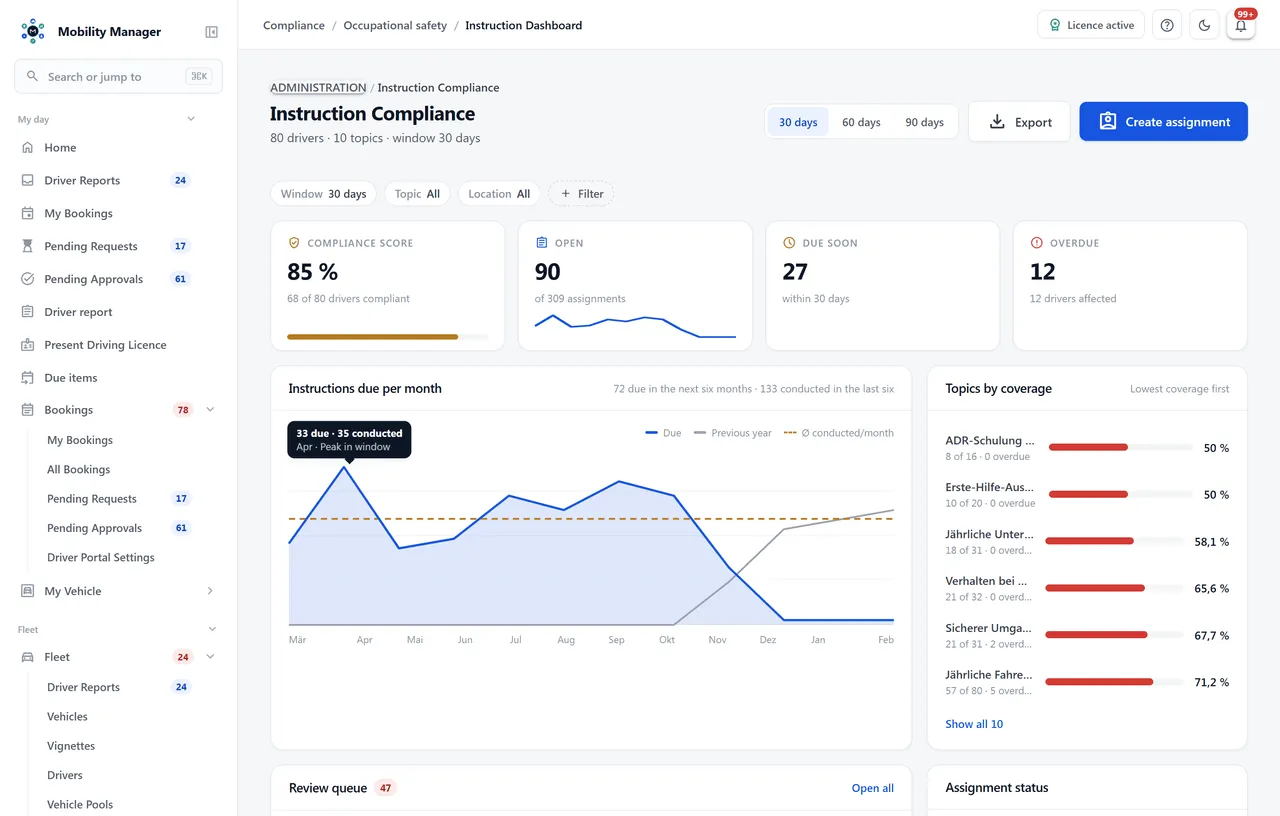
Instruction management overview · Real product view with demo data

Instruction management overview · Real product view with demo data

In detail

Everything this module takes off your plate.

Topics with legal basis and interval

Every topic names its legal basis (DGUV regulation 1, § 12 ArbSchG) and its repeat interval. Completion creates the follow-up assignment automatically; reminders run before the due date and overdue items escalate to fleet management.

Target groups that filter

A topic applies to a department, a location, a cost centre or every holder of a credential. The driver picker on assignment shows only those people — external drivers excluded, since their occupational safety belongs to their own employer.

Credentials that keep themselves current

Link a topic to a credential — the annual forklift instruction to the forklift licence, say — and "next instruction" on the driver file moves forward by the interval with every completion. Optionally the nightly run assigns the topic to every holder of the credential who does not owe it yet.

E-learning with comprehension check

Learning sections to work through plus a quiz with a pass threshold. Images, videos and documents attach to the section, and a minimum reading time per section is enforced by the server, not the browser. Proof is the digital acknowledgement with timestamp and IP address, or a signed attendance sheet.

A content library instead of copies

'Load securing' is written once and composed into every instruction that needs it. Revise the block and future instructions follow; instructions already given stay untouched. Retired blocks disappear from the picker and keep serving whatever already uses them.

Versioned content as evidence

Every instruction is pinned to the revision in force when it was assigned. Published revisions are never overwritten, only archived — a year later it is still provable what exactly was taught, as § 12 ArbSchG and DGUV regulation 1 require.

A question pool, not a fixed list

Each attempt draws a selection from a pool — 10 out of 20, for example. Which questions someone was given is recorded on the attempt, together with a reproducible record of the draw. No single questionnaire circulates through the department any more.

Filing external training

Courses attended elsewhere are recorded in one step against a training type — date, trainer, certificate. No learning content, no recurrence, but the same compliance export.

Compliance export

Every instruction with date, content, revision, participant, instructor and type of proof — for the accident insurer, internal audit and the day after an accident.
Instruction cycle

  1. Assigned
  2. Due
  3. Acknowledged or recorded
  4. Follow-up assignment

This page describes the module in detail. How safety instruction management is introduced in an organisation — internal e-learning, external training sessions and the proof chain down to the forklift licence — is on the overview page

Safety instruction management software
Licensing and rollout

Pay only for what you need. Run it where you want.

View pricing and packages
Module scope
You unlock what your team needs — package and selected modules define the scope, yet you still install a single application. We confirm which capabilities are included before you start, so your quote fits exactly.
Buy or hire-purchase
Buy once per vehicle and use it for good — or finance the purchase through hire-purchase. Unlimited users and drivers are always included; maintenance with updates and support is shown transparently per vehicle and year.
Operations and rollout
On your servers, in your private cloud or as a container — your data stays with you. We plan data migration, setup and training together with your IT team; managed operations are available on request.Self-hosted fleet management software: deployment and cost
FAQ

Common questions.

Personal demo

See Driver instruction live — on your own workflow.

Tell us how you work today. We show you the relevant features in the real product, answer your questions about rollout, operations and licensing — and get back to you personally by email after your request to find a time that suits you.

Cloudkasten GmbH

Developed and supported in Erftstadt near Cologne, Germany. You talk directly to the team behind the software.
info@cloudkasten.net
+49 2235 978 979 0

About the company (German)

Instruction management overview

Product screenshot with demo data. Scroll sideways to inspect the enlarged view.

Instruction management overview · Real product view with demo data