Legal Register Software for
Fleet, Workshop and Buildings
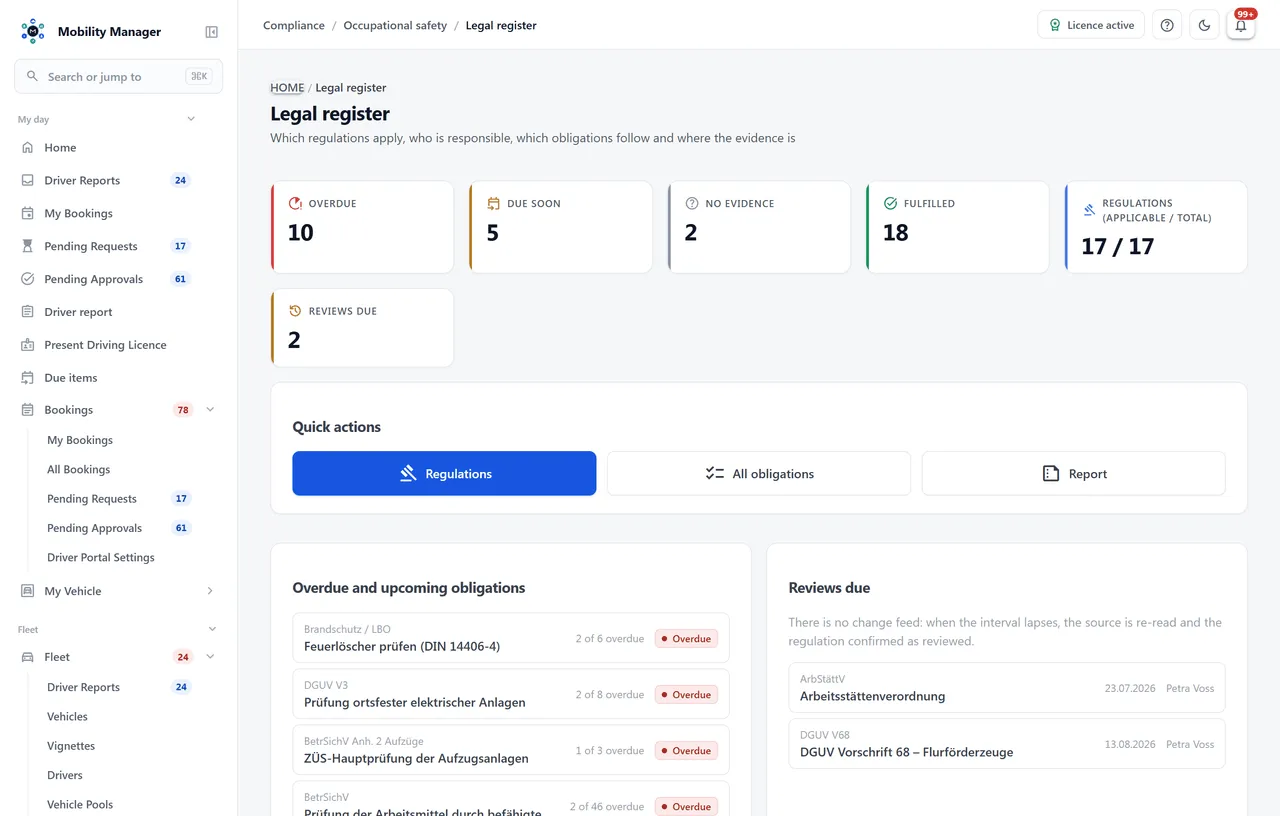
Which regulations apply, who is responsible, which obligations follow and where the evidence is. The difference: an obligation is not ticked off, it is computed — from the maintenance plans, instructions and credentials you already keep.
4 fulfilment sources
Maintenance · instruction · credential · manual
17 regulations
Starter catalogue, no professional sign-off
0 legal texts
Structure, not a publisher's product
The situation
The obligation is in one list. The evidence is somewhere else.
The publisher's legal register knows every regulation but not a single one of your devices. Maintenance planning knows every device but no regulation. In between sits someone with a tick.
The tick nobody believes any more
'DGUV V3 — done' says the spreadsheet. That three of 42 devices have been overdue since February says maintenance planning. Both are true, and at the audit only the second one counts.
'Who is actually responsible for this?'
The lift inspection belonged to the colleague who left in spring. Whether there was a deputy, nobody knows. A regulation without a responsible person is a regulation nobody reads.
Fleet, workshop, buildings — three registers
Vehicle inspections with the fleet, BetrSichV in the workshop, lifts and drinking water with facility management. Three lists, three formats, and no place where the managing director sees what is overdue right now.
From act to evidence
Document operator obligations in three steps
The structure is deliberately plain: regulation, obligations from it, evidence for them. The effort is in the third step — and that is exactly where the system takes over where it can.
Record the regulation
Act, ordinance, DGUV regulation, standard, permit or internal directive — company-wide or per site, with responsible person and deputy, source, summary and review interval. Or apply the starter catalogue and check it against the source.
Derive the obligations
An inspection, an instruction, a record, a notification, the appointment of an officer, a permit. Every obligation with a responsible person, optionally per site, with a recurrence in months.
Link — or record evidence
An obligation is linked to a maintenance template, an instruction topic or a credential from the driver file; its status then comes from that module. Everything else gets a due date and evidence with a document.
The actual lever
"3 of 42 devices overdue" — computed, not maintained
The status of 'DGUV V3 inspection' is the status of the 42 maintenance plans that carry that template — and those change every time an inspector books a report. A stored status would be stale between two runs. A computed one is right at the moment it is read.
So in the legal register nothing is retyped and nothing is maintained twice. An obligation knows its source: the maintenance template, the instruction topic, the credential. Its status follows from that — fulfilled, due soon, overdue — with the number behind it.
That is the difference from a publisher's legal register, where every one of those 42 lines would be retyped by hand.
What the system does about it
- The status is computed on every read and never stored — dashboard, report and reminder read the same rules.
- 'Due soon' is the same window everywhere: 30 days. One overdue item makes the obligation overdue, however many devices are in order.
- For computed obligations the earliest due date across all linked objects counts — the first lift due triggers the reminder, not the last.
- An inspection report filed on a computed obligation does not change its status — it does not make 41 other devices compliant.
Four fulfilment sources
The status comes from the module that already records the work
Three sources compute, one is kept by hand. Which applies is decided per obligation — not per regulation, because a regulation often has both.
Maintenance template
DGUV V3, UVV, BetrSichV § 14, lift inspection, fire extinguishers, drinking water, MOT: the status follows from the active maintenance plans of that template — one overdue plan makes the obligation overdue, with the count.
Instruction topic
'Annual instruction' is fulfilled when nobody in the target group is overdue. Judged by the due dates of the open instructions, not by a stored status.
Credential from the driver file
Forklift licence, ADR, G25: across all active credentials with that key, the earlier of 'valid until' and 'next instruction' decides.
Manual
What no module records carries its own due date and recurrence. Evidence with date, note and document moves the due date forward by the interval.
Starter catalogue
17 regulations for the first afternoon — explicitly without professional sign-off
Title, short name, legal area, link to the official source and one to three typical obligations with intervals. On apply, the obligations are bound to your existing maintenance templates — where none fits, a manual obligation with a note is created.
| Legal area | Regulations in the catalogue |
|---|---|
| Occupational safety | ArbSchGArbStättVBetrSichVDGUV V1DGUV V3DGUV V68TRBS 1201TRBS 1203GefStoffV |
| Traffic | DGUV V70StVZO § 29FZV |
| Buildings, environment, fire protection | BetrSichV annex 2 lifts1. BImSchVTrinkwVFire protection / LBO |
| Data protection | GDPR / BDSG |
The notice the system shows on every apply: the starter catalogue is a working aid without professional sign-off. The entries were not reviewed by a lawyer or an occupational safety specialist and carry no legal-currency date. Whether a regulation applies to your organisation, whether the summary is accurate and whether the intervals fit is your responsibility. The catalogue is German law; the entries are German.
What it deliberately is not
Structure, not content. That is the honest boundary.
A publisher provides legal texts and reports amendments. A specialist decides what applies to you. The module provides the frame in which both are recorded — and nothing more.
No change feed
Whether a regulation has been amended is something a publisher tells you; the module reminds you at the recorded interval to review it. What you find is recorded as a history with valid-from date, change note and document — as a memory, not as a legal source.
No legal texts
The starter catalogue names title, short name, legal area, source and typical obligations with intervals — nothing more. The source is a link to gesetze-im-internet.de, the DGUV or the BAuA, not a copy of the text with a legal-currency date.
No legal advice
Whether an obligation applies to your organisation is decided by the occupational safety specialist, not by the software. The 'applicable' field with a justification exists for exactly that — and a non-applicable regulation stays in the register with that reasoning.
For responsible persons and audit
The list you hand an auditor
The dashboard shows which obligations are overdue or due soon and which regulations are waiting for their review. The report lists every obligation with status, responsible person and due date — the one list instead of three registers.
And the evidence sits where an auditor looks for it: every document is filed with the regulation, one file per regulation. The evidence entry is the pointer that says which obligation the paper proves.
Dashboard with counters
Overdue, due soon, no evidence, review due — with a jump into the regulation and, for computed obligations, into the module behind it.
'Legal register' report
Every obligation with status, responsible person, site and due date as CSV, Excel or PDF.
Reminders through the automation
Due obligations and upcoming reviews are date sources: e-mail or notification X days ahead, with placeholders for obligation, regulation and responsible person.
Evidence that cannot be edited
Evidence is appended, never edited: date, who, note, document. A record you can change afterwards is not a record.
Legal compliance
Compliance does not come from one more list
It comes from inspection, evidence and due date hanging off the same object, and from a date no longer being maintained in three places. That has held for the fleet for years — and with installations, instructions and the legal register it now holds for the workshop and the buildings too.
- Every regulation has a responsible person and a deputy. Whoever applies the starter catalogue becomes responsible at first — somebody has to own the review.
- The decision 'does not apply to us' stays in the register with its reasoning. To an auditor it matters as much as the applicable regulation.
- Site scoping follows the product's data view: a regulation or obligation per site is seen only by those cleared for that site.
- The data sits on your infrastructure. Which obligations you have overdue is a report that is no vendor's business.
None of this replaces the occupational safety specialist. But they get a register in which their decisions are recorded and the status does not depend on the mood of a spreadsheet.
Not a point solution
The legal register sits next to the modules it computes from
Without them it keeps every obligation by hand. With them it computes — which is why it is part of the same installation rather than a separate purchase.
FAQ
Everything you need to know about the legal register
What is legal register software?
A legal register answers four questions: which regulations apply to us, who is responsible for them, which obligations follow, and where the evidence is. Legal register software keeps that structure — regulation, responsible person, obligation, evidence — and makes due dates visible. MobilityManager computes the fourth answer from the modules that already record the work: maintenance planning, driver instruction and the credentials on the driver file.
Is this a legal register with a change feed?
No. The module provides no legal texts, no legal assessment and no notifications when a regulation is amended. Instead, every regulation carries a review interval: it is re-read against the linked source at that rhythm and confirmed with 'Reviewed'; changes are recorded as a history with a valid-from date and a document. Anyone who needs a change feed combines the module with a publisher's product of their choice.
Where does an obligation's status come from?
For linked obligations, from the respective module: for 'DGUV V3 inspection' from the active maintenance plans of that template, for 'annual instruction' from the open instructions of that topic, for 'forklift licence' from the credentials in the driver file. For manual obligations from their own due date. The status is computed on every read and never stored — with counts: '3 of 42 overdue' instead of a tick. 'Due soon' means the same everywhere: within the next 30 days.
Has the starter catalogue been professionally reviewed?
No, and the apply dialog says so every time. The 17 entries for fleet, workshop and buildings are a working aid by the product team — not reviewed by a lawyer or an occupational safety specialist, with no legal-currency date. Whether a regulation applies, whether the summary is accurate and whether the intervals fit is checked by the operator against the linked source and confirmed with 'Reviewed'.
How do we document operator obligations that no module records?
As a manual obligation with a due date and a recurrence: the risk assessment, the appointment of the data protection officer, the notification to the health authority. Evidence with date, note and document moves the due date forward by the interval. Evidence cannot be edited afterwards — a record you can edit is not a record. The document is filed with the regulation: one file per regulation is what an auditor opens.
What happens to a regulation that does not apply to us?
It stays in the register with its reasoning. Whether an obligation applies to your organisation is decided by the occupational safety specialist, not by the software — and that decision matters to an auditor as much as the applicable regulation does. The 'applicable' field with a justification exists for exactly that.
Do we need maintenance planning and driver instruction for this?
No. Without those modules every obligation is kept manually with a due date and evidence. With them, the linkable obligations are computed — which is why the legal register sits next to those modules. Combined with device management and the building inspection kinds, DGUV V3, lift inspections, fire extinguishers and drinking water become computed obligations too.
How do responsible persons learn about a due date?
Due obligations and upcoming reviews are date sources of the workflow automation: e-mail or notification X days ahead, with placeholders for obligation, regulation and responsible person. For computed obligations the earliest due date across all linked objects counts — the day the first of 42 devices falls due is the day the responsible person needs to know.
Can we run it on our own servers?
Yes. MobilityManager is built to be self-hosted and sold as a perpetual licence — on your own hardware, in VMware/Hyper-V, in Docker or Kubernetes, or at a cloud provider of your choosing. The legal register is its own licence flag and is off by default.
Book a demo
See the legal register in action
Leave your details and we will show you how the starter catalogue is applied, how an obligation takes its status from maintenance planning and what the audit report looks like. Free, no obligation, about 30 minutes.
Send your request and we get back to you personally by email to arrange a demo around your fleet and your questions. Non-binding — nothing is ordered.
Loading the request form…
The form could not be loaded. No request has been sent. Reload it or contact us directly.
Your request could not be confirmed. Check the form feedback and try again. You can also contact us directly.
Thank you — your request is on its way.
We get back to you by email to find a time that suits you. Until then, feel free to explore the public live demo.
Information about processing your request: Privacy policy.
Direct contact: info@cloudkasten.net
+49 2235 978 979 0