Room Register Software with
Desk and Meeting Room Booking
The register first: which rooms exist, how many workplaces are in them, which are free right now. Then the booking: staff reserve desks and meeting rooms themselves — on the same site tree that holds vehicles and installations, with rules that apply per building.
3 workplace kinds
Desk · meeting room · workshop station
1 site tree
Rooms, vehicles and installations in one catalogue
∞ users
No per-user fees
The situation
Hybrid working made desks scarce — and nobody knows how many there are
Two days a week desks are short, three days they stand empty. Whoever has to decide whether to give up a floor or rent a building has no number to work from — and no register.
The room register is a purchasing spreadsheet
How many rooms the administration building has is in the caretaker's head. How many desks are in them is in an order list from three years ago. Which of them are in use right now, nobody knows.
The meeting room is always booked — and empty
The room's Outlook calendar is full because series never end. Whoever actually needs the room walks past and checks whether the light is on. A calendar is not an occupancy board.
One more tool with one more site catalogue
The desk-sharing app from the cloud knows neither the buildings from the fleet nor the roles from the directory. Every site is created a third time — and the attendance data sits with a vendor.
Register first, booking second
From the building to the booked desk in three steps
The first two steps produce a complete room register. The third is optional — and takes less time than the e-mail people used to send.
Building, floor, room on the site tree
'GDS13b → 1st floor → Office 104' as a typed path with code, floor number, area and capacity. The same tree in which vehicles are stationed and installations are mounted — a room is created once and is the same room everywhere.
Capture workplaces and furniture
Every desk, meeting room and workshop station is its own unit with a label, equipment and allocation. A whole numbered run is created in one step. Furniture stands in the room as inventory.
Book — or let it assign
Date and time window, optionally building, kind or minimum capacity: the search shows only what is free for the whole window. Anyone who does not need a specific place can have one assigned. Approval only where the building requires it.
The actual lever
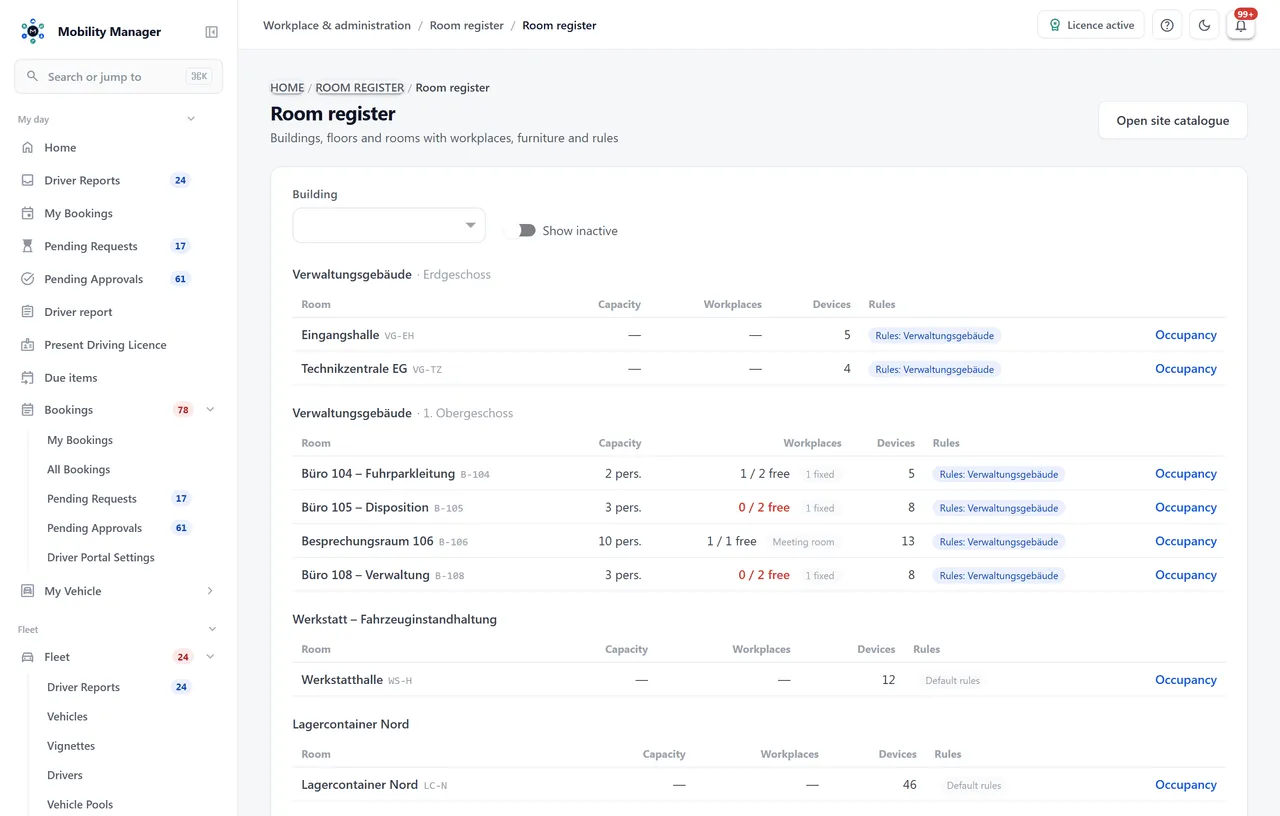
"Office 104: 3 desks, 1 free, 7 devices" — that is the whole page
Desk-sharing apps start with the booking and leave the register to a floor-plan editor nobody maintains. A year later the plan is wrong, and the booking reports desks free that no longer exist.
Here it is the other way round. The room is a node on the site tree, the workplace a row in that room, the furniture a device with an inventory number. "Free" is never stored; it is computed from bookings and closures — the register cannot disagree with the search because both read the same calculation.
And anyone who stays home after all releases their desk with one tap. The booking stays in the history as completed, the capacity is back in the pool.
What the system does about it
- Availability is computed from the real end of a booking: checking out at eleven frees the afternoon.
- A permanently assigned desk never appears in a search and never counts as free — only the assigned person can reserve it.
- A person holds at most one desk at a time; a meeting room comes on top, because that is a normal working day.
- Two simultaneous bookings for the last desk are resolved at the database level, not by luck.
Not every place is the same
Three workplace kinds, three allocation modes, one closure
A capacity figure on the room is worth nothing to somebody who then walks an open-plan floor looking for their place. So every place is its own unit — with a kind and an allocation.
Desk
One person, one place. With equipment as free text, the 'height-adjustable' attribute and optionally a cost centre that overrides the room's.
Meeting room
Booked as a whole, for up to n people. The booking carries the attendee count; the search filters on 'at least n'.
Workshop station
A bay in a workshop or lab with the tools that belong to it — the same booking logic as a desk.
Bookable
The normal case: free for anyone who belongs to the building's audience. Free is whatever nobody holds right now.
Permanently assigned
Never appears in a search and never counts as free capacity. Only the assigned person can reserve it.
Out of service
The desk a team gave up when it moved out, or the station that made way for a machine — indefinitely.
Closure
Dated, with reason and optional end: painting, refurbishment, cleaning. Blocks bookings, stays visible on the occupancy board and can be lifted.
Rules per building
Head office rations meeting rooms. The depot does not.
Three hundred rooms in one building follow the same house rules. So the policy hangs off the building or site — and a room inherits the rules of the nearest node above it.
One policy per building or site
Booking horizon, maximum duration, approval, guest bookings and the default day window. Without a rule of its own the defaults apply: day bookings, 30 days ahead, 8 to 18 o'clock, no approval. One building, one row.
Site-level data view down to the room
Anyone cleared for a building sees its rooms — not the neighbouring buildings. A 'Facility management' role template maintains buildings, rooms, installations and inspections without holding a single vehicle permission.
Close, reschedule, lift
Painting in office 104? The closure carries reason, start and optional end, blocks bookings and stays visible on the occupancy board. Affected bookings are rescheduled rather than cancelled; after the works the closure is lifted.
Workplace occupancy overview
The figure that shows you the full Tuesday before it arrives
The dashboard shows per building how many workplaces there are, how many are free right now and how many bookings are waiting for approval. Underneath sits peak occupancy for the coming weeks — day by day, from the bookings already made.
Peak, not average: a floor that is 40% occupied on average and 100% every Tuesday is full. An average would report it as comfortable — and that is the reason nobody acts.
Room list with counters
Per room: workplaces, of which free, devices in it, applicable rules. The page you open when someone asks whether there is still space on the third floor.
Occupancy board per day
A timeline per workplace: who sits when, where a closure lies, which booking is not yet approved, who has checked in.
Approval queue
Only for the buildings that need one. Approve or reject with a reason — rejected bookings never occupy, not even for a minute.
Series and guests
'Every Tuesday and Thursday' is expanded into individual bookings and cancelled as a whole. A guest gets a place in the host's name, with company for reception.
What it is not & data protection
A room register, not space management. And booking data is attendance data.
Anyone who wants to draw floor plans, allocate space costs per cost centre or plan a move is looking for space management — this module is not that. It answers which rooms exist, what is in them and who sits where and when. The last question is where a works council is right to look closely.
- No floor plans, no space-cost management, no move planning. An importer for a furniture stocktake is not part of this version — a building is captured by hand.
- The data sits on your infrastructure. There is no vendor analysing who was in the office when, and no cloud contract permitting that.
- Access to other people's bookings is its own permission and is restricted by site; the self-service views only ever show your own.
- Every change to a booking runs through the platform's audit trail — the same complete logging as the rest of the fleet.
A works agreement does not become unnecessary — but it is considerably easier to reach when the answer to "where does the data live" is not "with a vendor in another country".
Not a point solution
Rooms, parking spaces and installations on the same site tree
The room register runs on its own — but it shares the master data with the other modules. Anyone running several maintains every person and every site once.
FAQ
Everything you need to know about the room register and desk booking
What is room register software?
A room register records which rooms a building has, what is in them and what they are for: building, floor, room with code, area and capacity, and beneath them the workplaces and the furniture. In MobilityManager, rooms are nodes of the same site tree in which vehicles are stationed and installations are mounted. Desk booking builds on top: desks and meeting rooms become bookable if you want them to — the register is complete without booking.
Do we have to create our rooms a second time?
No. Rooms are nodes of the site tree — the same catalogue in which vehicles are stationed, devices are stored and installations are mounted. 'GDS13b → 1st floor → Office 104' is a typed path with code, floor number, area and capacity. Anyone already maintaining the tree has their room register; the module adds the bookable units.
What does the workplace occupancy overview look like?
Three levels. The room list says per room '3 desks, 1 free, 7 devices'. The occupancy board shows a timeline per workplace for the chosen day — who sits when, where a closure lies, which booking is still awaiting approval. And the dashboard shows peak occupancy per building for the coming weeks, day by day. 'Free' is never stored; it is always computed from bookings and closures — the register cannot disagree with the search.
Can employees book meeting rooms themselves?
Yes, in the same self-service as desks. Pick a date and time window, optionally a building, kind or minimum capacity — a search for 'at least eight people' returns only rooms that seat them, never a desk. The booking carries the attendee count, and a room for ten does not accept a booking for twelve. A person holds at most one desk at a time but can book the room they meet in that afternoon on top.
Do the same rules apply in every building?
Only if you want them to. Booking horizon, maximum duration, approval, guest bookings and the default day window hang off the building or site as a policy; a room inherits the rules of the nearest node above it. Without a rule of its own the defaults apply: day bookings, 30 days ahead, 8 to 18 o'clock, no approval. Head office may ration its meeting rooms without the depot doing so.
How is furniture recorded?
As a device in the room: desks, chairs and pedestals are kept in device management with an inventory number, assigned to the room and counted in the stocktake. The room list shows per room how many devices stand in it. Furniture counts against no licence counter — you pay for the workplaces, not the chairs in them.
What happens when someone books and then stays home?
They release the desk with one tap. The booking is completed and the desk is immediately bookable again for the rest of the window. The same logic applies to checking out early: leaving at eleven frees the afternoon. A series — 'every Tuesday and Thursday' — is expanded into individual bookings on creation and can be cancelled as a whole.
Is this space management?
No. The room register is a room register: no floor plans, no space-cost management, no move planning. It answers which rooms exist, what is in them and who sits where and when — on the same site tree as vehicles and installations. An importer for a furniture stocktake is not part of this version; a building is captured by hand, workplaces as a numbered run in one step.
Do we need parking management for this?
No, the two modules run independently. They share the site tree, the driver file and the roles — and the same booking mechanics, deliberately copied rather than abstracted, so a parking bay and a desk may grow apart. Anyone running both has parking and desk for the office day in one system.
Can we run it on our own servers?
Yes. MobilityManager is built to be self-hosted and sold as a perpetual licence — on your own hardware, in VMware/Hyper-V, in Docker or Kubernetes, or at a cloud provider of your choosing. For desk bookings that is not an academic point: who sat in the office and when is an attendance report, and this data never leaves your infrastructure.
Book a demo
See the room register and desk booking in action
Leave your details and we will show you an administration building with a floor, offices and a meeting room, desk booking from the employee's side and the occupancy board from administration's side. Free, no obligation, about 30 minutes.
Send your request and we get back to you personally by email to arrange a demo around your fleet and your questions. Non-binding — nothing is ordered.
Loading the request form…
The form could not be loaded. No request has been sent. Reload it or contact us directly.
Your request could not be confirmed. Check the form feedback and try again. You can also contact us directly.
Thank you — your request is on its way.
We get back to you by email to find a time that suits you. Until then, feel free to explore the public live demo.
Information about processing your request: Privacy policy.
Direct contact: info@cloudkasten.net
+49 2235 978 979 0