Tyre sets per vehicle
Summer, winter or all-season, mounted or in storage, with dimension, storage location and change history. A change writes both sides: the outgoing set is dismounted, the new one mounted.
Review the fitted set, measurements and seasonal changes together with the vehicle.
30 minutes, the real product, your workflow at the centre — free and non-binding.
Package: Both packages
How you use itRecord the tyre type and set for the vehicle. Maintain the relevant season and usage details.
Record tread measurements at the wheel positions. Compare them with the configured limits and recommendations.
Record the change or review and accept a driver submission. Check the set history and seasonal campaign progress.
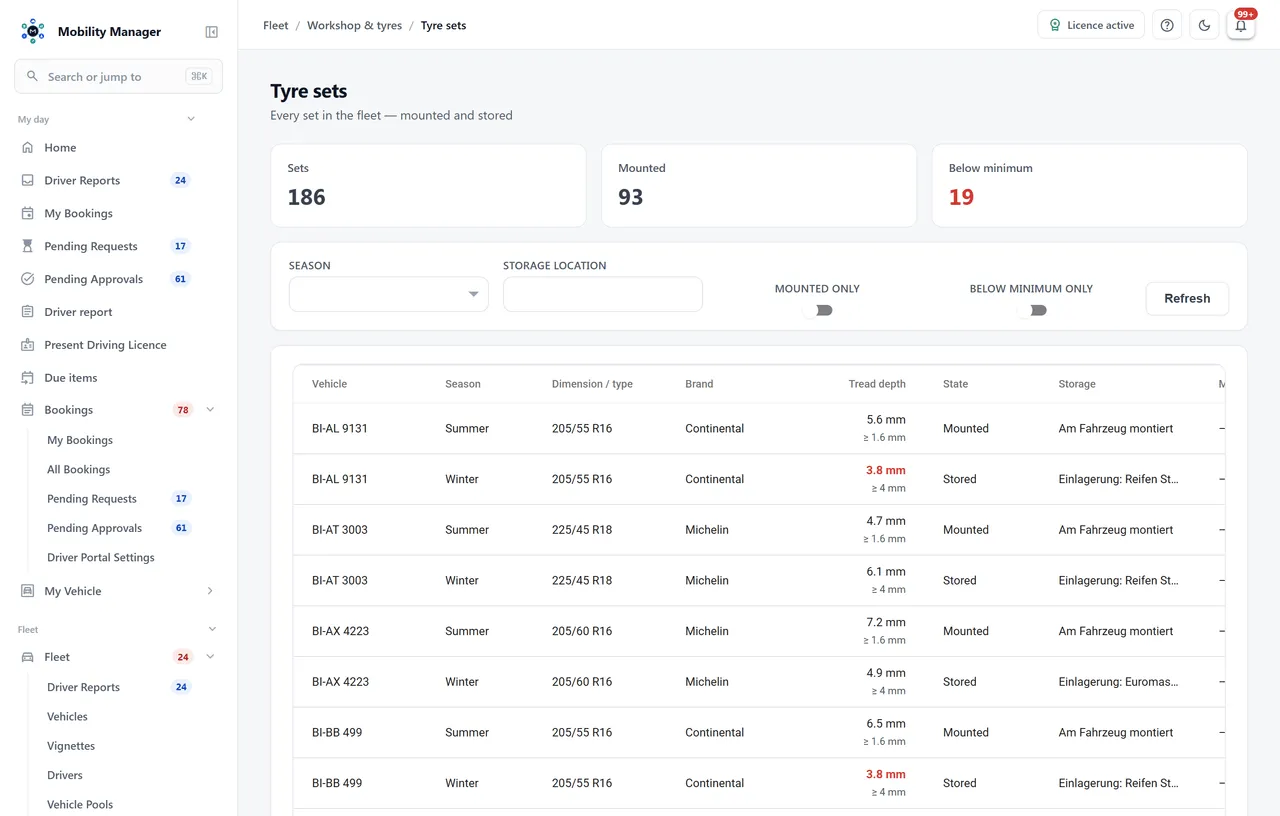
Tyre set overview · Real product view with demo data
Summer, winter or all-season, mounted or in storage, with dimension, storage location and change history. A change writes both sides: the outgoing set is dismounted, the new one mounted.
Front left, front right, rear left, rear right — each measurement with date, odometer and a 'new tyres' flag. The lowest value of the most recent measurement is the vehicle's tread depth.
The statutory minimum (default 1.6 mm) marks a vehicle as unsafe to drive. The seasonal recommendation (default 4.0 mm winter, 3.0 mm summer) is the point at which a fleet swaps — and what the pre-season list is actually about.
An all-season tyre is driven through the winter, so the stricter value applies to it. An unknown season falls back to the stricter value too, rather than guessing 'probably summer' and understating the risk.
The winter change is anchored in October, the summer change on Easter Monday; the lead window is configurable. The reminder goes out as an automation to the assigned driver and names the mounted set, target set, storage location, dimension and tread depth.
If a change is missed it rolls into next year. The useful statement in November is 'you are on summer tyres and the winter change was due', not 'you are 400 days late' — a permanently red row eventually goes unread.
Makes and types as a tenant-maintained catalogue, plus a fleet-wide set list that highlights sets below the minimum. A type in use is deactivated rather than deleted.
When a driver reports the change themselves, the review confirms or corrects the change date and odometer. The odometer then joins the same series as every other reading — not a side path straight onto the vehicle.
Because uneven wear is precisely the information a single number hides — and because a tyre worn on one side points at a suspension problem, not at mileage. Wherever a single number is needed — tyre list, driver report, lease return — the lowest value of the most recent measurement applies.
It does, which is exactly why both thresholds are configurable per tenant. The statutory value is preset to 1.6 mm following German regulation; you set it to the value that applies to you.
Through the same automation engine that already sends inspection and contract deadlines: a 'seasonal tyre change due' date source, a threshold trigger and the e-mail action with the assigned driver as recipient. No separate service, no second recipient logic.
Yes, with storage location and dimension on the set. It is not a bin-management system for storage racks — if you manage shelf positions, that is what warehouse management is for.
Tell us how you work today. We show you the relevant features in the real product, answer your questions about rollout, operations and licensing — and get back to you personally by email after your request to find a time that suits you.
Developed and supported in Erftstadt near Cologne, Germany. You talk directly to the team behind the software.
info@cloudkasten.net
+49 2235 978 979 0