Import odometer readings
Readings from the portal are recorded on the vehicle with their source — the same plausibility check as manual entry, the same basis for mileage-based maintenance intervals.
Connect supported data and review the latest synchronisation. The integration focuses on mileage and driving licence checks.
30 minutes, the real product, your workflow at the centre — free and non-binding.
Package: Both packages
How you use itConfigure a supported provider connection or choose file import. Prepare access and record matching.
Enable mileage readings and driving licence checks separately as needed. Test the connection before regular synchronisation.
Run the import manually or on a schedule. Check the latest result and resolve errors or unclear mappings.
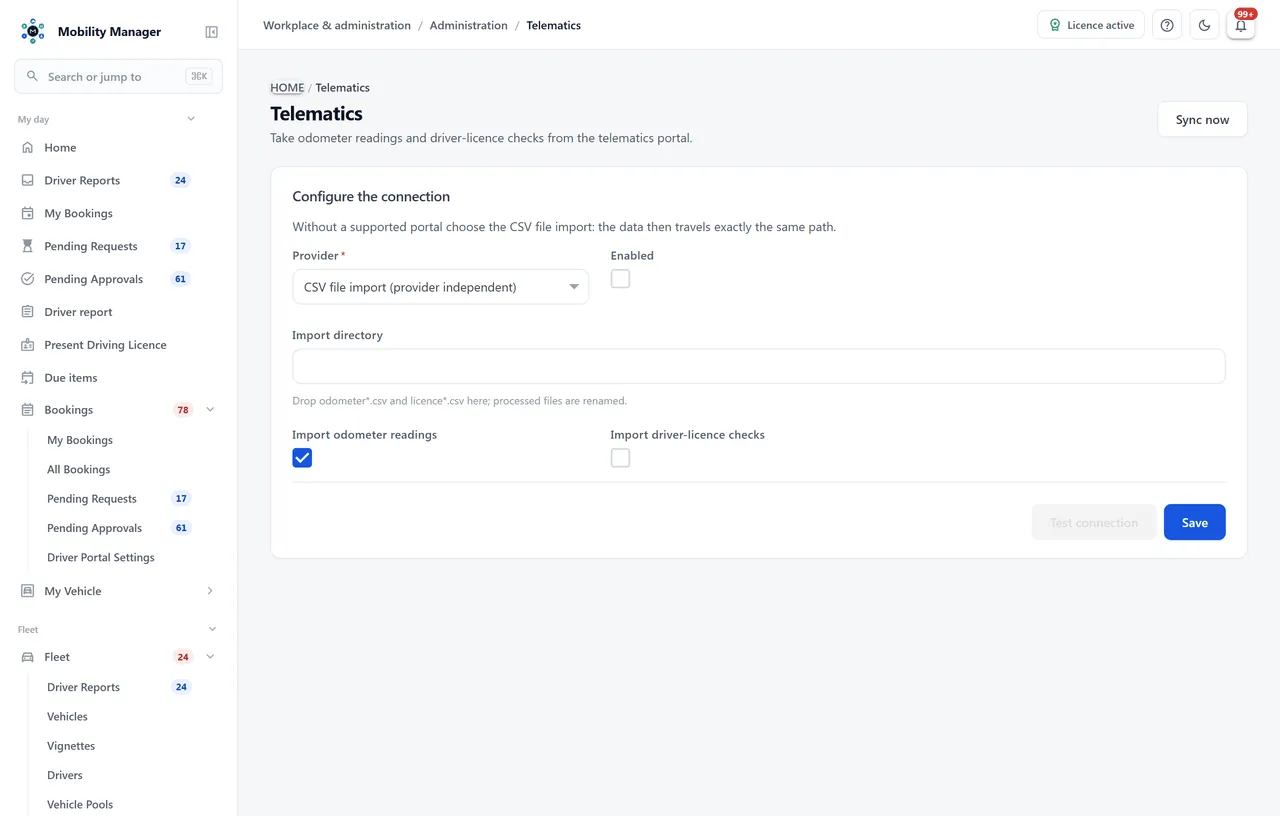
Telematics connections · Real product view with demo data
Readings from the portal are recorded on the vehicle with their source — the same plausibility check as manual entry, the same basis for mileage-based maintenance intervals.
If your telematics provider performs the visual check via RFID seal, those checks are imported and appear as evidence in driving licence control.
Without a supported portal you drop odometer*.csv and fuehrerschein*.csv into an import directory. Processed files are renamed so no run reads the same reading twice.
Odometer readings and licence checks are two switches. If you only need readings, only readings are transferred.
Portal address and credentials can be verified before the first automatic run. Stored secrets survive a save when the field is left empty.
A background service syncs regularly; in addition a run can be triggered by hand at any time.
Per integration you see when the last run happened and what it produced, in numbers — how many readings and how many checks were taken over.
A mixed fleet may run several integrations at once; each is enabled, tested and reported on individually.
Yes, through the provider-neutral CSV file import. Your portal exports odometer readings as a file, a directory picks them up, and from there they travel the same path as a direct integration. A real integration with further portals is available on request — that is project work, not a switch.
No. Only odometer readings and, if enabled, licence checks. Movement data, positions and driving behaviour are deliberately not fetched — that would amount to monitoring conduct and performance, with consequences of its own under works-council law.
No. What is imported are checks your telematics portal produced itself — via an NFC reader in the vehicle, for instance. A direct integration with a pure seal-check provider is not included. Drivers checked externally can be flagged in the driver file with their provider and fleet ID, so it stays clear who is controlled in-house and who is not.
In your installation, like all other data. The integration is configured inside the application; the credentials live in your database and never leave your infrastructure.
Tell us how you work today. We show you the relevant features in the real product, answer your questions about rollout, operations and licensing — and get back to you personally by email after your request to find a time that suits you.
Developed and supported in Erftstadt near Cologne, Germany. You talk directly to the team behind the software.
info@cloudkasten.net
+49 2235 978 979 0