A search, not a list of spaces
Pick a window, optionally filter by site, charging point or cover — the system offers only spaces free for the whole window. Anyone who does not care which space they get can have one assigned.
Check time, location and space type together before employees or visitors arrive.
30 minutes, the real product, your workflow at the centre — free and non-binding.
Package: Resources add-on
How you use itChoose a period and parking facility. Filter by space type or charging-space properties where needed.
Book a suitable space. Process any approval required by the facility’s booking rules.
Record check-in and check-out. Check-out releases the remaining period for another booking.
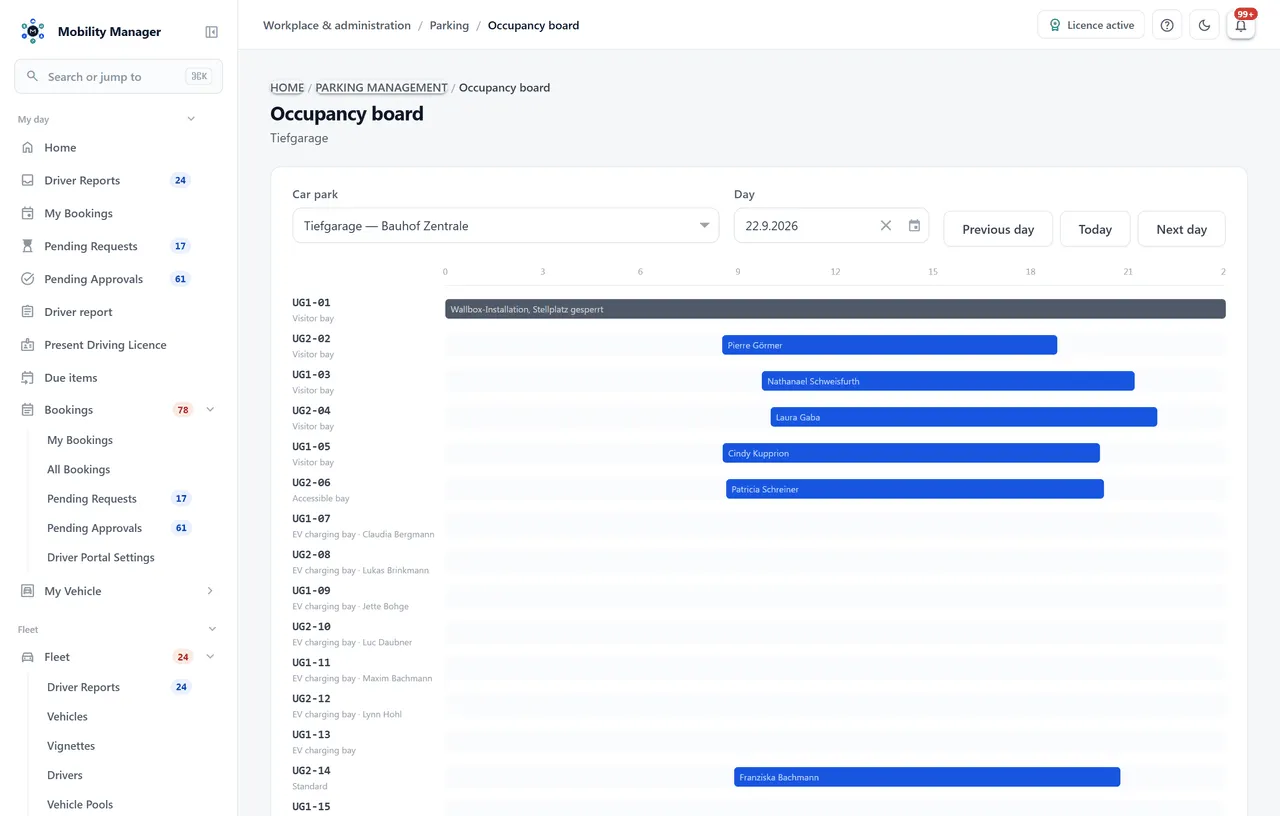
Parking occupancy overview · Real product view with demo data
Pick a window, optionally filter by site, charging point or cover — the system offers only spaces free for the whole window. Anyone who does not care which space they get can have one assigned.
Every car park hangs off the same site catalogue vehicles and drivers use. A site-bound role sees only the car parks of its own site.
EV drivers filter straight to charging points, and the dashboard reports free charging bays separately — the number a headline occupancy figure hides.
Staff book in their guest's name, with company and number plate. Reception gets the list of who is expected today.
Assigned bays — the board, the works council, a pool car's charging bay — never appear in a search and are never counted as free capacity. Only the assigned person can book their own.
A space can be closed for a dated period — line painting, a wallbox install, a skip. Permanently assigned bays too. The closure blocks bookings and stays visible on the occupancy board.
Scarce car parks can require approval without subjecting the outdoor lot to the same rule. Approvers get their own queue.
A timeline per space for the chosen day, plus peak occupancy for the coming weeks — the figure that shows Tuesday is becoming a problem before it is one.
Only if they should. Car parks hang off the site catalogue, and the product's site-level access control applies here too: a role restricted to one site sees only that site's car parks — in the search, on the occupancy board and in the reports.
They release the space with one tap — the booking is completed and the space is bookable again for the rest of the window. That is the difference between a list and a booking system: an unreleased reservation is a space nobody could use.
Yes. The plate is recorded as free text and never joined to the fleet — a private number plate is the employee's own data, not a fleet master record. Anyone arriving in a company car picks the vehicle instead.
No. A whole numbered run is generated in one step — prefix, from and to number, digits, level and type. A 64-space garage is captured in a minute; individual spaces are adjusted afterwards.
No, parking management runs on its own. It shares the site catalogue, the driver file and the roles with the other modules — so anyone running both maintains sites and people only once.
Tell us how you work today. We show you the relevant features in the real product, answer your questions about rollout, operations and licensing — and get back to you personally by email after your request to find a time that suits you.
Developed and supported in Erftstadt near Cologne, Germany. You talk directly to the team behind the software.
info@cloudkasten.net
+49 2235 978 979 0