Recorded promptly
Drivers enter trips themselves; completed pool bookings with odometer readings produce drafts to confirm. Entries recorded long after the trip are visibly flagged as not prompt.
Bring trip details together per vehicle and retain a visible correction history for confirmed entries.
30 minutes, the real product, your workflow at the centre — free and non-binding.
Package: Professional
How you use itEnter details manually or review a draft from a completed pool booking. Add purpose, route and odometer readings.
Confirm the details and review them in the queue. Resolve mileage gaps and other findings.
Use a reasoned correction entry to fix mistakes. Export trips and their purpose allocation for further review.
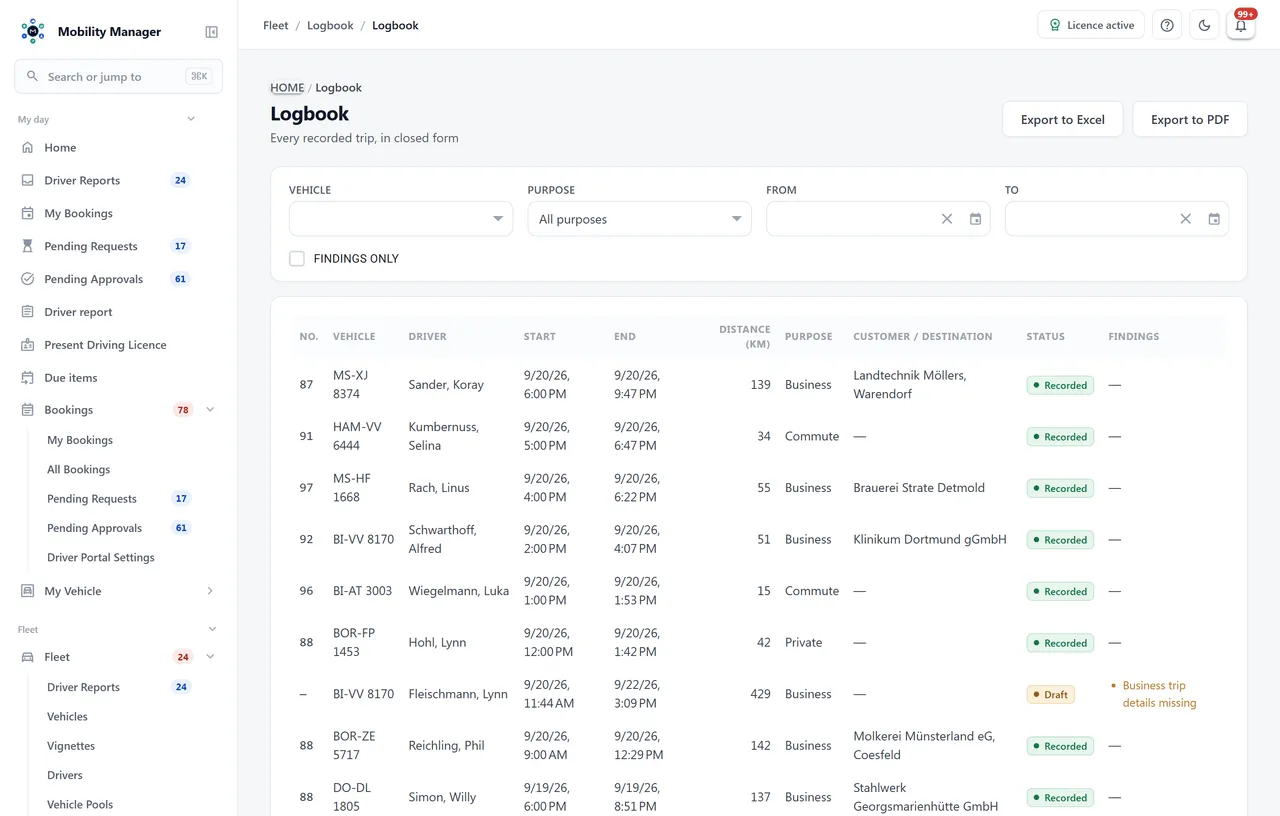
Trip log overview · Real product view with demo data
Drivers enter trips themselves; completed pool bookings with odometer readings produce drafts to confirm. Entries recorded long after the trip are visibly flagged as not prompt.
Every confirmed entry receives a gapless sequential number per vehicle. Entries are never deleted — only an unconfirmed draft can be discarded.
Each entry is chained via SHA-256 over its facts plus the hash of its predecessor. The integrity check runs on demand and shows exactly where a chain breaks.
Closed entries can neither be edited nor deleted. A correction is a new entry with a mandatory reason and a field-by-field diff — both stay visible in lists and exports.
Fleet management sees gaps, overlaps and late entries per vehicle. A finding can be accepted with a reason — the acceptance covers exactly that finding; if the gap grows, it reopens.
Business, commute and private per vehicle in kilometres and percent. Logbook and purpose split export as PDF and Excel — corrected entries stay included, marked as corrected.
Optional: logbooks can be closed month by month per vehicle, as no. 14.1 of the VwV Kfz Baden-Württemberg requires. A closed month accepts no further trips and no corrections; anyone who needs one reopens it with a stated reason — logged, and with its own seal per month.
That decision rests with the tax office in each case. The module enforces the formal criteria technically: prompt recording with visible flagging of late entries, gapless sequential numbering per vehicle, and a hash chain that rules out silent changes — every correction stays documented as a correction.
The entry is not edited but corrected: a new correction entry references the original, the reason is mandatory, and the field diff shows what changed. Both entries stay visible in lists, reports and exports.
No. From completed pool bookings with odometer readings the system creates drafts the driver only reviews and confirms. The trip's purpose must be stated by the driver — blind bulk confirmation is deliberately impossible, because a logbook full of unattested entries would be worthless.
The requirements of section 14 are implemented technically: date, purpose, route with start and end point, driver name and odometer readings per trip, entries made at the start or end of a trip, corrections only recognisable as such (no. 14.3.6), and an electronic logbook in which later changes are ruled out or at least documented (no. 14.3.7). Monthly closing under no. 14.1 is switched on per tenant; the closing states entries, kilometres, odometer and checksum, so the Dienststelle receives it in the form no. 14.6 expects by the tenth of the following month. For logbooks kept for the taxable benefit, monthly closing stays off — nobody requires it there.
Tell us how you work today. We show you the relevant features in the real product, answer your questions about rollout, operations and licensing — and get back to you personally by email after your request to find a time that suits you.
Developed and supported in Erftstadt near Cologne, Germany. You talk directly to the team behind the software.
info@cloudkasten.net
+49 2235 978 979 0